







AWS Key Management Services enable companies to create, manage, and control cryptographic keys in the cloud. In 2025, 85% of enterprises using AWS development company implemented KMS to meet regulatory standards and protect sensitive data. A fintech company used KMS to encrypt customer transactions, reducing the risk of data breaches by 40%. Analytics show that automatic key rotation and centralized management have improved overall security and compliance in the cloud.
Elinext: Leading Experts in Cloud Engineering Services
Elinext uses Amazon Management Services and cloud application development services to protect customer data and applications. An e-commerce startup relied on Elinext for KMS integration, enabling transaction encryption and simplifying compliance. Their cloud engineering expertise enables them to build reliable, scalable, and secure solutions for modern enterprises.
The Concept
So, what is the main concept of the AWS KMS service? In a nutshell, it’s all about reliable tools to organize your encryption processes in a more secure way. All the processes can be separated into 2 levels of encryption using different types of keys.
First encryption level is aimed at granting you with master keys, which are typically used to generate, encrypt, and decrypt the data keys. The important point of master keys is that such keys are created in AWS KMS and never leave it unencrypted. To use or manage your master keys, you access them through AWS KMS. Inside your application, you will work only with data keys.
The second encryption level is aimed to encrypt and decrypt your data using data keys.
These keys are used outside of AWS KMS and never stored, managed, or tracked by the service. It is your responsibility to decide where and how you will keep data keys. An important point of data keys is that such keys are generated using master keys in 2 forms: encrypted and unencrypted. The first form is only used to be stored somewhere. You should not store unencrypted data keys anywhere. To do encryption or decryption, you need to use the second form, which can also be restored from the encrypted form using the master key.
This strategy is known as envelope encryption. You can read more about this concept and envelope encryption strategy.
How it actually works
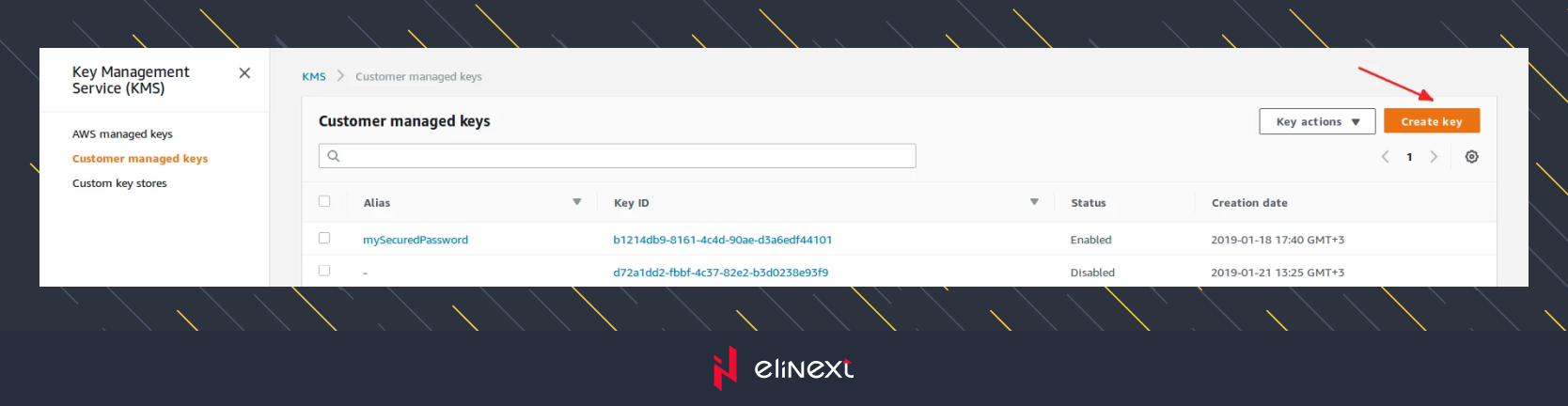
First, you should proceed to master key creation. To do this, open the AWS KMS console, go to the “Customer managed keys” section and click on the “create key” button.
AWS KMS console
The key creation form will open. This form is split into several steps. During the first step, you can specify an alias for the key. Later, aliases can be used instead of key ID. If you need more details about aliases, that form has a link to the documentation. Let’s use myMasterKey alias and click on the “next” button.
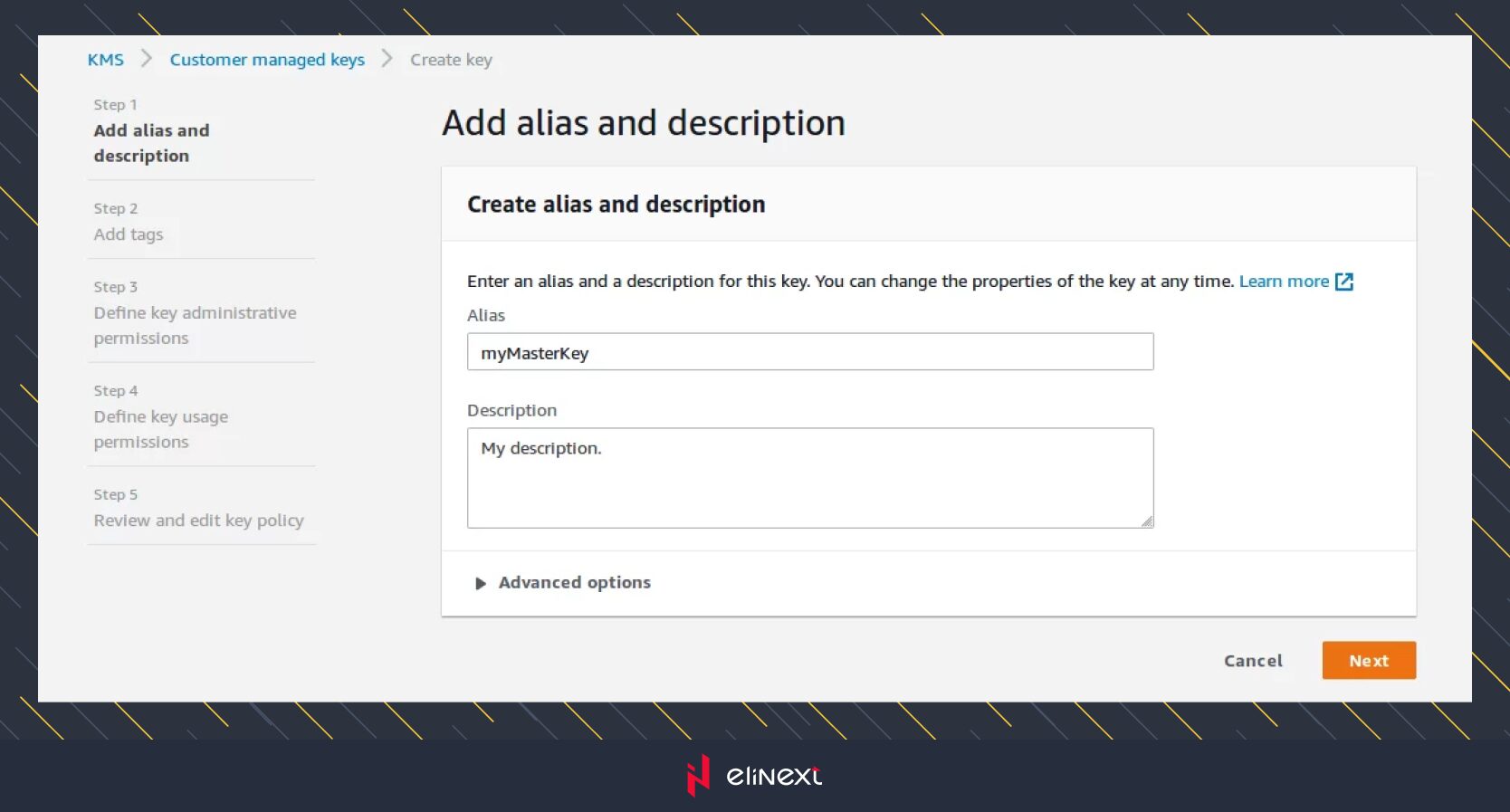
MyMasterKey
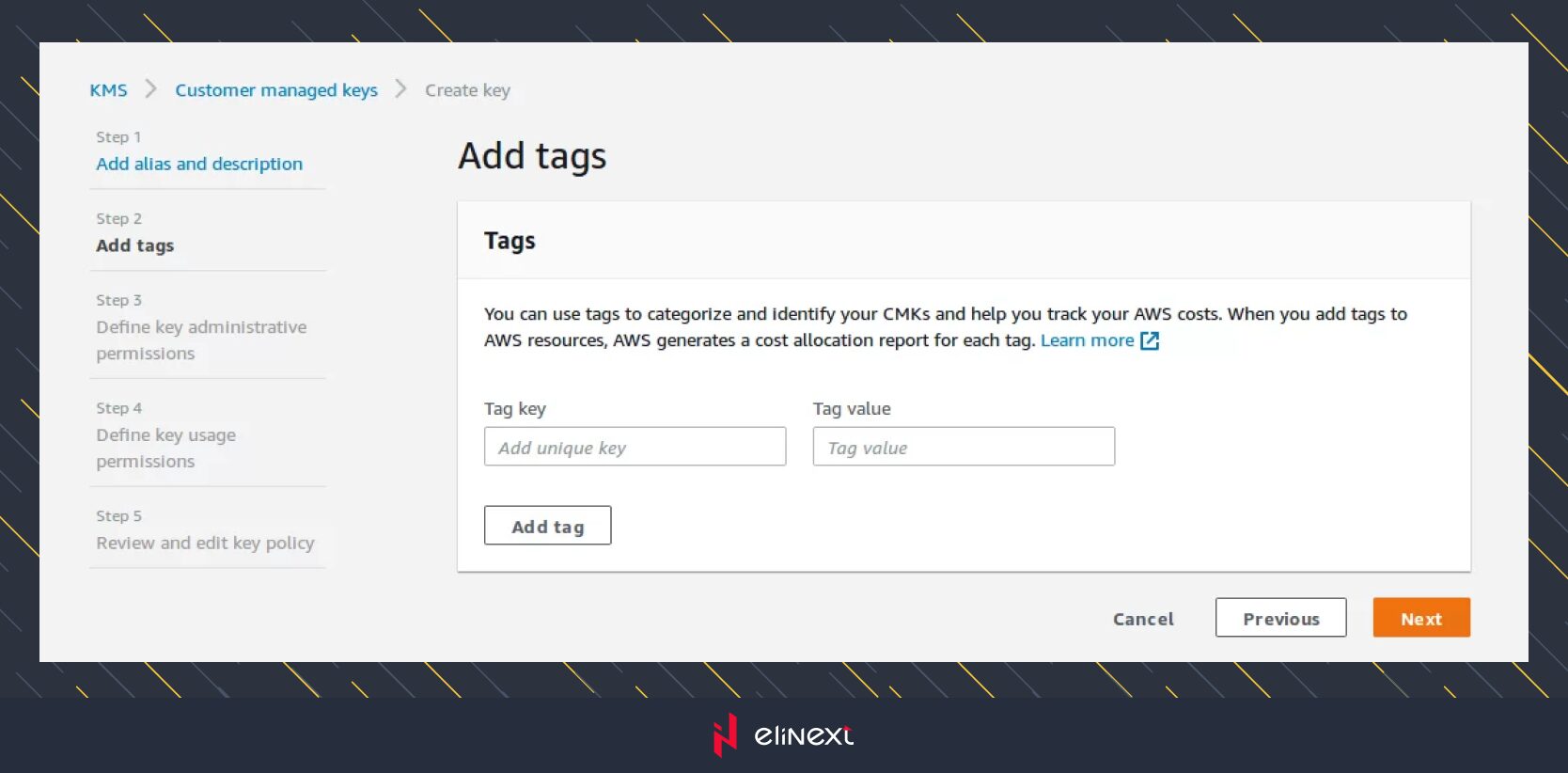
In the second step you can specify a tag to categorize the key. If you need more details about tags, that form has a link to the documentation. But, we will leave it empty in this example and click on the “next” button.
On the third step you can select the roles to define who can manage your key using AWS KMS API. If you need more details about roles usage, that form has a link to the documentation.
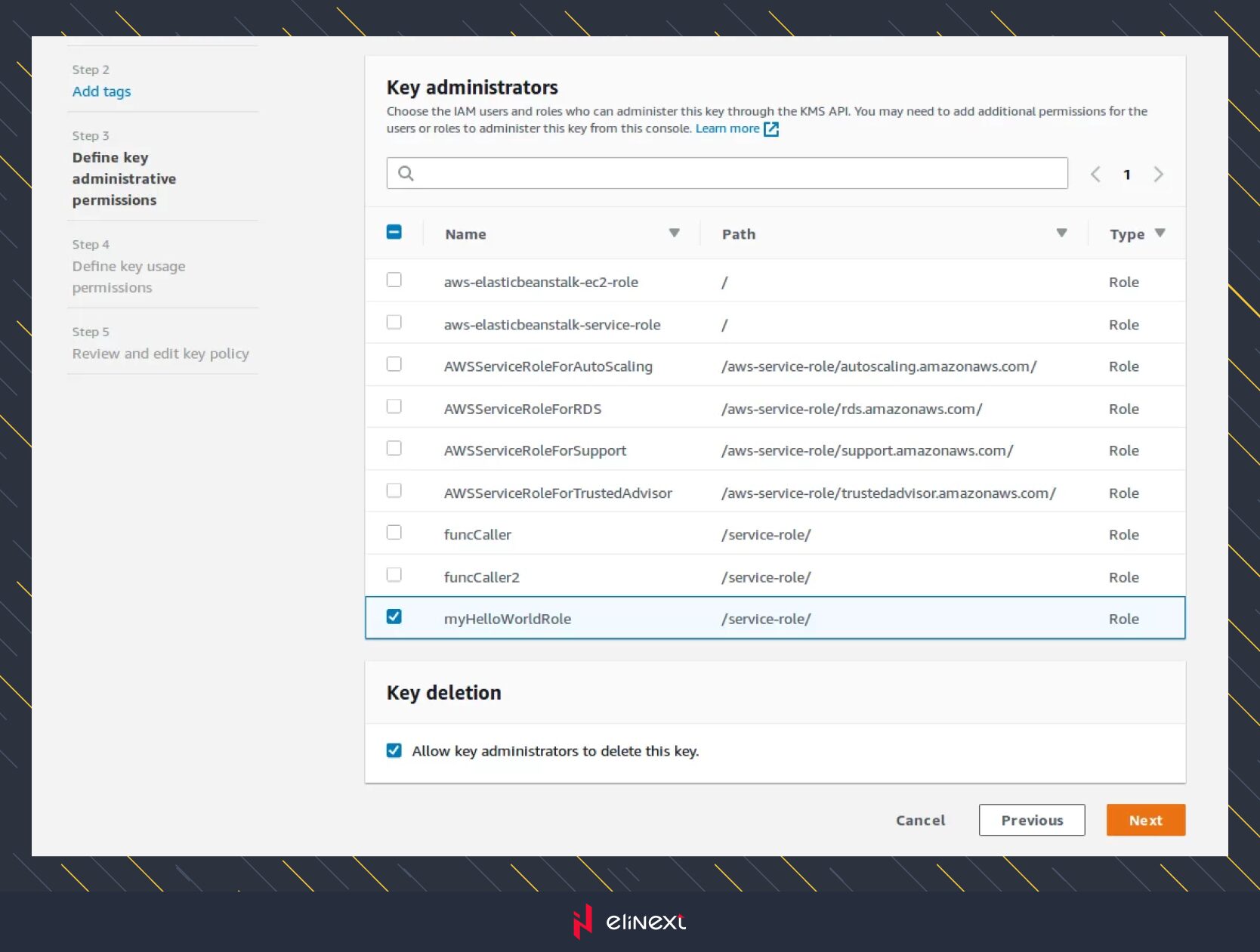
In the fourth step you can select the roles to define key usage permissions. It affects data encryption and decryption with the AWS KMS API. This step looks similar to the previous one, so there’s no need to post a screenshot. Just select the roles and click on the “next” button.
After that, you will see the final step with the key details, where you can review and edit the key policy. But, as we are satisfied with the current result, we will click on the “finish” button. In the opened list of keys, we can see a new key. Its ID is highlighted on the screen below, and later will be used to call API methods.
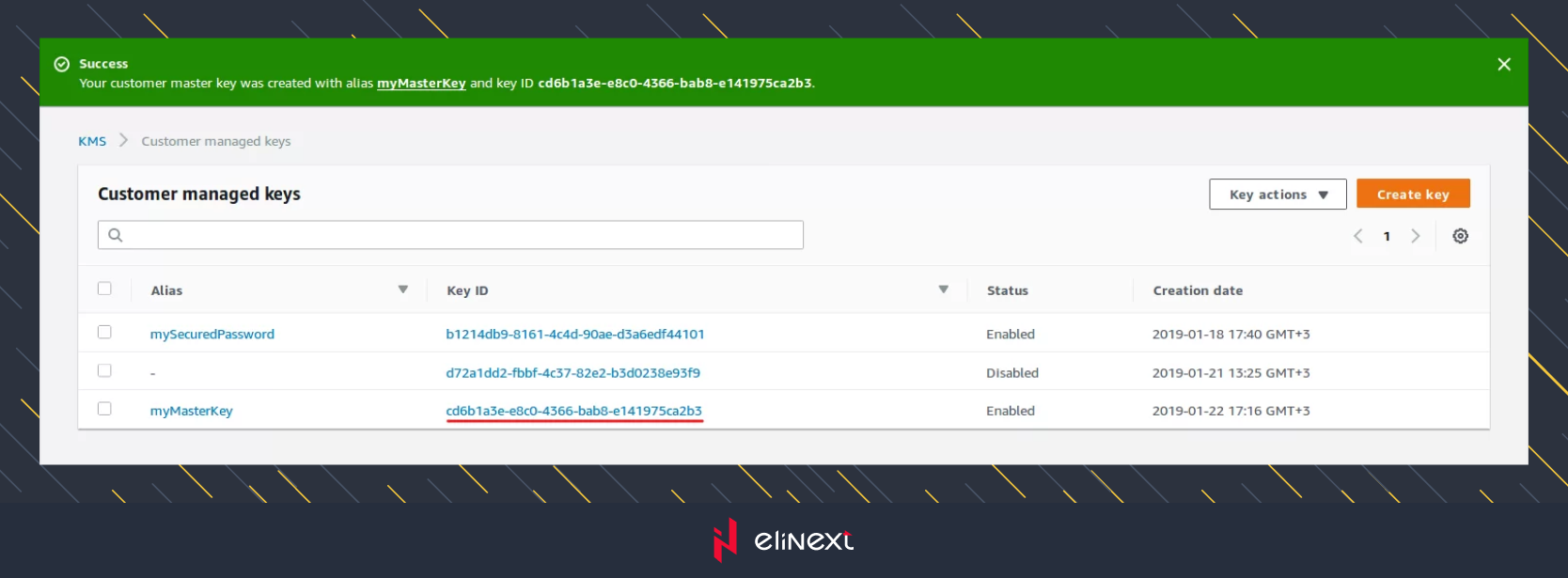
Now, we have the master key and we can generate a data key to start the data encryption process. It can be achieved in 2 ways. 1) Using KMS API in the application. 2) Using the KMS command line tool.
KMS API
Inside the application, to start data encryption/decryption, we will first need to get the master key. As you already know, this key is stored in the AWS account only, and the application keeps solely data keys. It is assumed that AWS API itself is already configured with correct credentials. So we will focus on interesting API methods for our case only. If you’re interested to know how to install AWS API you can read the description there.
All the code snippets will be provided using PHP language.
To work with AWS KMS service, we will need Aws\Kms\KmsClient class :
use Aws\Kms\KmsClient;
$kmsClient = new KmsClient([
‘version’ => ‘latest’,
‘region’ => ‘us-east-2’,
‘credentials’ => $credentials // <— for your account.
]);
Now, let’s get our previously created master key :
$keySpec = ‘AES_256’;
$masterKeyId = ‘cd6b1a3e-e8c0-4366-bab8-e141975ca2b3’;
$dataKey = $kmsClient->generateDataKey([
‘KeyId’ => $masterKeyId,
‘KeySpec’ => $keySpec,
]);
As you can see, to generate a data key, we need to know only the master key’s ID and the algorithm to crypt. As a result, this method returns an object which holds 2 representations of a data key. The first one is encrypted, the second one is in the plaintext format. Why so? Because inside an application, we should store only encrypted keys. But all the operation with data will be performed using a plaintext key. After all the operations are done, the plaintext key should be removed.
To get an encrypted data key, you need to get a CiphertextBlob key from response object :
var_dump(base64_encode($dataKey->get(‘CiphertextBlob’)));
To get a plaintext data key, you need to get a Plaintext key from response object :
var_dump(base64_encode($dataKey->get(‘Plaintext’)));
So, now we have generated the data key, and can start the data encryption process. For this part, AWS API is no longer needed. We can use native PHP means.
// prepare key.
$cipher = “AES-128-CBC”;
$ivlen = openssl_cipher_iv_length($cipher);
$iv = openssl_random_pseudo_bytes($ivlen);
$key = base64_encode($dataKey[‘Plaintext’]); // <— Plaintext data key.
// encrypt the data.
$ciphertext = openssl_encrypt($text, $cipher, $key, $options=OPENSSL_RAW_DATA, $iv);
// decrypt the data.
$original_plaintext = openssl_decrypt($ciphertext, $cipher, $key, $options=OPENSSL_RAW_DATA, $iv);
In the sample above, both encryption and decryption processes go together. But in reality, the flow will be different. Following the encryption, the plaintext data key will be deleted, and the encrypted data key will most likely be stored in the database. Then, when data will be decrypted back, the encrypted data key will be extracted from the database and decrypted to plaintext format.
$ciphertextBlobDataKey; // <— get encrypted value from database.
$result = $kmsClient->decrypt([
‘CiphertextBlob’ => $ciphertextBlobDataKey,
]);
$plaintextKey = $result[‘Plaintext’];
That is all you need to do basic data encoding / decoding. Of course, KMS API provides much more actions to manipulate the data. You can find all of it there.
KMS command line
Another way of using AWS KMS service is executing console commands either manually or by application. To do so, you need to install AWS Encryption CLI SDK first, and you can find how to do it there.
Once it is installed, you have everything you need to perform encryption / decryption processes. As an example, to encrypt “hello.txt” file, you can execute command below :
\\ To run this example, replace the fictitious CMK ARN with a valid value.
$ cmkArn=arn:aws:kms:us-west-2:111122223333:key/1234abcd-12ab-34cd-56ef-1234567890ab
$ aws-encryption-cli –encrypt \
–input hello.txt \
–master-keys key=$cmkArn \
–metadata-output ~/metadata \
–encryption-context purpose=test \
–output .
To understand the basics with more examples, please see this documentation page.
Secure your cloud future with Amazon Management Services – invest in AWS Key Management to protect sensitive data, ensure compliance, and build customer trust today!
Business Value and Future of AWS Key Management Services
AWS Key Management Services provide centralized encryption, access control, and auditability. As data protection regulations become more stringent, KMS adoption is expected to increase by 30% by 2025. A healthcare provider used KMS to ensure HIPAA compliance. The future includes deeper AI integration and automated threat detection, making KMS an indispensable tool for secure cloud operations.
“As cloud engineers, we know that Amazon key management services are essential for secure SaaS app development services. By automating key rotation and permissions management, KMS helps us protect customer data, comply with regulatory requirements, and optimize cloud operations. This is key to building reliable and scalable cloud solutions.”Elinext Software Expert
Conclusion
AWS key management services, a key part of advanced cloud engineering services, enable companies to protect data at scale. Elinext implemented KMS for a logistics firm, automating encryption across multiple environments. This improved security and compliance, and simplified audits. As cloud adoption grows, KMS remains the foundation for reliable, efficient, and future-proof cloud infrastructures.
FAQ
What is AWS Key Management Service (KMS)?
Amazon key management services is a cloud-based solution for creating, storing, and managing encryption keys. KMS secures medical records in healthcare applications.
What problem does AWS KMS solve?
AWS key management services solve the problems of secure storage, rotation, and access control for keys. KMS prevents unauthorized access to encrypted financial data in the cloud.
What types of keys does AWS KMS manage?
Amazon key management services handle symmetric and asymmetric keys. KMS stores encryption keys for both API communication and digital signature verification.
How does envelope encryption relate to AWS KMS?
Amazon key management services use envelope encryption, encrypting data keys with master keys. KMS encrypts files in S3 using envelope encryption for additional security.
How does AWS KMS integrate with other AWS services?
KMS automatically encrypts data stored in S3 buckets and EBS volumes. Amazon key management services are integrated with S3, EBS, and RDS to provide seamless encryption.
